
- English (active language)
- NZSL
If you’re enrolled by Sunday 4 October 2026, you’ll be sent an EasyVote card. Your EasyVote card will arrive close to the start of voting.
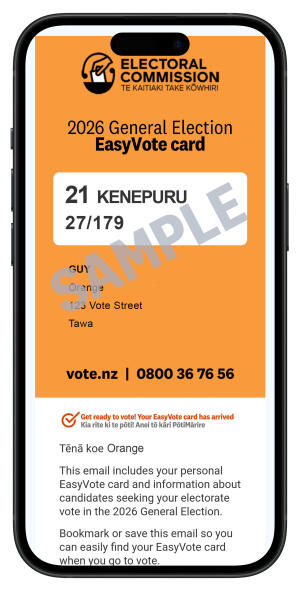
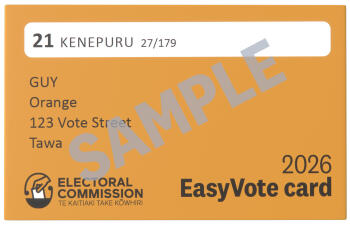
Your EasyVote card makes voting faster and easier
Your EasyVote card makes it easier to find you on the electoral roll at your voting place. But you don’t need it to vote. If you’re enrolled you can vote at any voting place without it.
Your EasyVote card may arrive by email or post
If you’ve told us your email address, we’ll send your EasyVote card by email. Otherwise, we’ll send it in the post.
We won’t send your EasyVote card by text message.
If you want to receive your EasyVote card by email, Sunday 4 October is the last day to add your email address to your enrolment record. You can add your email address using our online enrolment service or by filling in an enrolment form.
4 October is also the last day you can remove your email address if you want to receive your EasyVote card by post. To do that, call 0800 36 76 56.
We cannot add your email address to your enrolment record, or remove it from your enrolment record, after Sunday 4 October 2026.
Take your EasyVote card with you to vote
When you go to vote, take your EasyVote card with you and show it to the workers at your voting place. They’ll use it to help find you on the electoral roll so they can mark you off and give you your voting papers.
If you get your EasyVote card by post, then you can tear off the card from the bottom corner of your letter, or bring the whole letter – it’s up to you.
If you get your EasyVote card by email, you can bring it in on your phone. If you won’t have data in the voting place, you can take a screenshot. And if you don’t get email on your phone (or don’t have one) you can print it out, or you can vote without it.
What information is included with my EasyVote card?
Your EasyVote card will come with a list of the electorate candidates you can vote for.
You can find which parties you can vote for with your party vote and read their party lists here:
You can find your nearest voting place here:
What if I don’t receive an EasyVote card?
If you enrol or update your details after Sunday 4 October you won’t be sent an EasyVote card – but as long as you’re enrolled to vote by midnight, Sunday 25 October, you can still vote at any voting place.
If you’re sure you’re enrolled, but your EasyVote card hasn’t arrived, then remember you don’t need it to vote – just head along to any voting place without it.
If you’ve given us your email address, we will have sent your EasyVote card by email. It’s worth checking that your EasyVote email hasn’t gone to your spam folder, or another category folder such as 'Promotions'.
What if I’m on the unpublished roll?
If you’re on the unpublished roll and your enrolment is up-to-date by Sunday 4 October then you’ll be sent an EasyVote letter in the post. We won’t send your EasyVote by email.
What if I turn 18 after voting starts?
If you are 17, but turn 18 on or before election day, you can vote as long as you apply to enrol by midnight, Sunday 25 October 2026. You won’t be sent an EasyVote letter or email – just head to any voting place to vote.
What if I enrolled to vote or updated my details after 4 October?
If you enrolled to vote or updated your enrolment details between Sunday 4 October and 6pm, Thursday 22 October, and you provided us with your email address, we’ll email you a voting slip.
If your voting slip arrives after you’ve already voted, you can’t vote again, so you don’t need to do anything with the email.
If you enrolled to vote or updated your details after 6pm on 22 October, you won’t be sent a voting slip – but you can vote without one at any voting place.
Automatic translation of EasyVote emails
The translation tools built into some email applications may cause some of the content in your EasyVote email to appear incorrectly. This could include the name of your electorate, your name and address, and the names of electorate candidates, as well as other information in the email.
We don’t recommend translating your EasyVote email into any other language. When you show your EasyVote card to workers at your voting place, it needs to show your electorate details and your name and address as they were sent to you, without translation.
If you have automatic translation turned on in your email application or browser, you should turn it off before viewing your EasyVote email.